Quotes App - Daily Motivation
- 4.7
- Rating
- 100.00K
- Installs
- Free
- Price

 Analysis by App-foxy
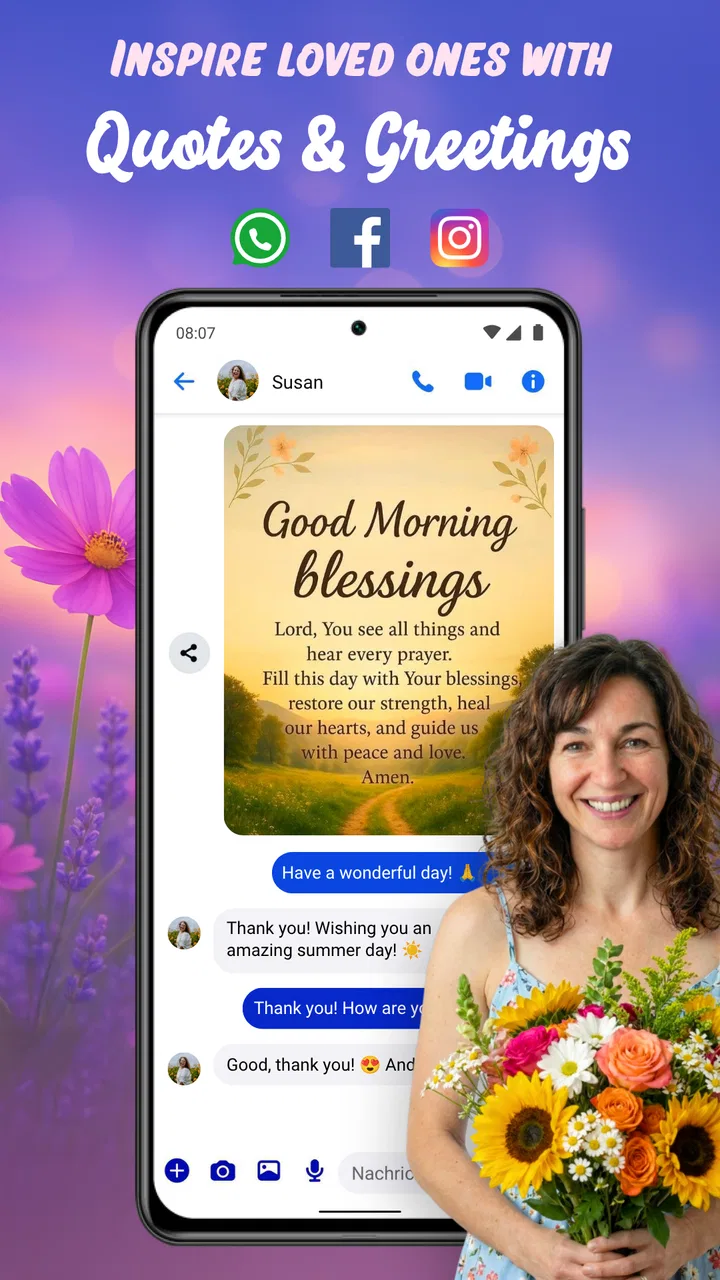
I opened Quotes App - Daily Motivation expecting a simple collection of shareable sayings, and that is exactly where its appeal lies. It is a free Books & Reference app from good space. Sprüche & Bilder zum Verschicken, built around inspirational quotes, affectionate messages, and short daily thoughts that can be sent to other people. I found it most useful when I wanted to say something kind quickly without writing a message from scratch.
This is not an app I would choose for deep reading, research, or long-form personal development. Its value is more immediate: browse a message, find one that fits the moment, and share it. The current release is version 5.15.7, and the app has already reached over 100 thousand installs. That gives it a more established feel than a brand-new quote collection, while its 4.7 average from roughly 700 ratings suggests that its straightforward purpose works well for many users.
How the current version feels in everyday use
The strongest part of the experience is the low effort involved. When I am looking for a morning greeting, a supportive line for a friend, a romantic message, or a small reminder to keep going, a dedicated quote app is faster than searching the web. The content is presented for quick discovery rather than careful study, so I can make a choice in a short session and get back to the conversation that prompted me to open it.
You May Also Like

 Blood Strike: 2.5 Anniversary
Blood Strike’s Loadouts Turn Every Drop Into a Tactical Gamble
A close look at Blood Strike’s custom loadouts: how fast access to signature weapons reshapes its battle royale rhythm, rewards preparation, and narrows the gap between fights.

 Pandora - Music & Podcasts
Pandora’s Music Is Easy to Start, but Harder to Recover
Pandora’s strength is its low-effort path from a seed to a station. Its weak spot is how much confidence it asks you to place in connection, setup, and quiet recovery.

 8 Ball Pool
 Is Built on Rivalries, Rematches, and Routine
A close look at the rivalries, rematches, shared routines, and unanswered safety questions that turn a quick pool match into a persistent mobile community.

 Samsung Music
’s Quiet Strength Is Playing What You Already Own
Its reach comes less from spectacle than from dependable access to a personal library. That simplicity is both the app’s strongest retention engine and its ceiling.

 AccuWeather: Weather Radar
AccuWeather Review: A Quick, Clear Forecast for Everyday Decisions
For everyday plans, the best forecast is the one you can understand quickly. AccuWeather makes rain timing, radar, and local conditions easy to act on, with a few trade-offs.

 Hill Climb Racing
Why Hill Climb Racing Still Turns Crashes Into One More Run
A tiny car, a bumpy hill and one more upgrade: Hill Climb Racing keeps resurfacing because its simple chaos makes every near-miss feel personal.
More From Our News Desk



That focus also makes the app easy to understand. Someone who is not comfortable with complicated menus can approach it without much preparation. The store short description calls it a Quotes App, and that plain label is accurate: it does not try to be a journal, social network, writing course, or reference encyclopedia. I appreciate that narrow identity because it keeps the main task clear.
The daily angle is particularly suitable for people who enjoy small prompts rather than lengthy motivational material. A quote can work as a morning message, a status update, a private reminder, or a gentle way to reconnect with someone. I would not treat every line as profound, but the app does not need every entry to change my outlook. Sometimes a familiar sentence is enough to start a conversation or brighten an ordinary day.
Its Books & Reference classification makes sense in a broad, lightweight way. I use it more like a pocket source of short written material than a traditional book app. That distinction matters before installing it: users expecting complete books, author biographies, literary analysis, or a searchable academic reference tool should look elsewhere. This is a browsing and sharing utility, not a digital library.
Where it fits into a real routine
A realistic example is a busy morning when I remember a friend has an important appointment. I may not have time to compose a thoughtful paragraph, but I can open the app, look for an encouraging message, and send something warmer than a generic “good luck.” Later, I might use a different style of message for a family group or choose a romantic line for a partner. The practical benefit is not that the app replaces personal communication; it helps me get past the blank-screen problem.
There is also a useful distinction between sending a quote immediately and saving it mentally for the right occasion. If I find something that matches a friend’s situation, I can use it as a starting point and add my own sentence. That is better than forwarding a message with no context, because the quote supplies the mood while my words make the exchange personal.
For people who regularly send greetings, the app can become a small creative shortcut. It may be especially appealing to users who enjoy image-based messages and short emotional texts but do not want to design their own cards. On the other hand, anyone who dislikes prewritten sentiments may find the material too familiar or too polished. The experience depends heavily on whether you enjoy communicating through ready-made expressions.
What the published release information tells me
The app was released on February 28, 2025, and the current version is 5.15.7. I read that progression as a sign that the developer, good space. Sprüche & Bilder zum Verschicken, has continued working on the product rather than leaving it as a one-off collection. A version number alone does not prove that every update transformed the experience, but it does tell existing users that the app is being maintained as an active product.
The important point is to separate what is visible now from what I might hope to see later. The current release gives me a focused way to discover and share short messages. It does not automatically make the material more original, more personal, or more useful for every situation. Continued development would be most valuable if it improved discovery and helped users adapt messages instead of simply adding more similar entries.
There is also a practical cost consideration. The app is free to install, which makes trying it low risk, but it includes in-app purchases ranging from $1.49 to $39.90 per item. I would check the purchase screen carefully before confirming anything, especially if I only want occasional messages. Free access is a strong advantage for casual use, while the presence of optional spending means the full experience may depend on how much content or convenience a user wants.
The Teen content rating is another useful signal for families. I would still make my own judgement about individual messages before sharing them with younger relatives, because a broad age label cannot describe every emotional or romantic theme in detail. For ordinary teen and adult use, the rating feels consistent with an app centered on greetings, motivation, affection, and shareable text.
What changes mean for people who already use it
For an existing user, a current release like this is less about learning an entirely new product and more about whether the app remains convenient. If I already use it for daily greetings, the main question is whether I can continue finding suitable messages without feeling that the collection has become repetitive. The app’s basic role is stable, so familiarity is an advantage: I know what to open when I need a quick line.
That stability can also create a limitation. A returning user may quickly recognize the tone and patterns of popular motivational writing. If I send similar phrases often, friends may notice that the messages feel selected from a collection rather than written for them. My workaround is to treat each quote as a draft. I add a specific detail, explain why it reminded me of the person, or shorten it to fit the conversation. This takes only a few seconds but makes the result feel much less automatic.
Another useful habit is to choose the message before opening the chat where I plan to send it. That reduces the temptation to forward the first attractive image I see. I can compare the tone against the occasion: encouragement should not sound romantic, a cheerful morning greeting may be wrong for someone dealing with bad news, and an affectionate message may be too personal for a work contact. The app supplies options, but the responsibility for context remains with me.
Existing users should also think about storage and attention. A quote app is easy to revisit repeatedly because each session is short, yet endless browsing can become less productive than simply writing a sincere sentence. I get the most value when I use it with a purpose—finding a message for a particular person or moment—rather than scrolling without knowing what I want.
Useful ways to get more from the collection
My first tip is to search by emotional function, not just by occasion. Instead of looking only for “good morning” or “love,” I think about what I want the recipient to feel: reassured, remembered, celebrated, forgiven, or energized. That approach helps me avoid sending a technically appropriate quote that still feels emotionally wrong.
My second tip is to edit before sharing. Even a small change can make a stock message sound like me. I might remove an overly dramatic phrase, add the person’s name, or follow the quote with a concrete offer such as “Call me when you are free.” This is one of the app’s less obvious strengths: it gives hesitant writers a starting point without forcing them to send the wording unchanged.
My third tip is to use the app as a prompt for original writing. If a quote catches my attention but does not quite fit, I ask myself what part of it feels relevant. Then I write two sentences about my own experience. In that workflow, the app becomes a private idea generator rather than a forwarding machine, and the final message is more likely to sound genuine.
A fourth consideration is visual communication. Shareable images can make a greeting feel more noticeable than plain text, but they are not always suitable. In a professional conversation, a short typed message may be clearer and less distracting. In a family or friends’ chat, the visual format may be welcome. I would choose the presentation based on the recipient instead of assuming that a decorative message is automatically better.
The trade-offs compared with familiar alternatives
The usual alternative is a web search. A browser offers a much wider range of material, including famous quotations, poems, speeches, and highly specific topics. It is better when I need a quotation from a known author or want to verify wording. The dedicated app is more convenient for casual daily messages because it keeps the browsing experience centered on ready-to-share sentiments rather than mixing them with unrelated search results.
Another alternative is a social media platform. Social networks provide abundant inspirational content, but they also bring feeds, notifications, comments, and distractions. I prefer a focused quote app when I want to find one message quickly without entering a larger social environment. If I want discussion, discovery through people I follow, or public interaction, social media is the stronger choice.
Messaging apps themselves are better for personal communication because they already contain my contacts and conversation history. I would not install this app to replace them. I use it before sending a message, then return to the messaging app to add context. That extra step is worthwhile only when I am stuck for wording or want a visual greeting; otherwise, writing directly is faster and more authentic.
There is also a difference between this kind of app and a meditation or habit-building tool. A motivational quote may provide a brief lift, but it does not create a structured practice, track progress, or guide a difficult problem in depth. Someone seeking sustained mental-health support, coaching, or a daily exercise plan should choose a purpose-built service. This app works best as a small emotional nudge, not as a complete personal-growth system.
Where the experience still falls short
The biggest weakness is the unavoidable tension between convenience and originality. Ready-made messages save time, but they can sound generic when used repeatedly. I would be cautious about sending an intense romantic or inspirational line to someone whose communication style is more casual. The app can help me express a feeling, but it cannot know the relationship, history, or boundaries involved.
The free model also deserves attention. A free download is appealing, especially for someone who only needs occasional greetings, but the in-app purchase range means I should not assume that every desirable option will remain equally accessible. I would try the free experience first and decide whether it already covers my needs before spending money. For a user who sends messages only a few times a month, paying may not be necessary.
Content repetition is another possible source of friction. Quote collections often rely on familiar themes—hope, love, friendship, success, and encouragement—so heavy users may notice similar wording over time. My solution is to rotate between using a quote directly, adapting one, and writing from scratch. If I want a constant stream of highly specific or unusual material, a broader reference source will probably serve me better.
The app is also not the right choice for every communication setting. I would avoid using a sentimental image as a substitute for an apology, a serious explanation, or a difficult conversation. In those moments, clarity and personal responsibility matter more than a polished phrase. The app can open the door to a conversation, but it should not be used to hide from one.
Who should install it and what to watch next
I recommend trying it if you enjoy sending daily greetings, need occasional help finding the right tone, or like combining short text with shareable images. It is a particularly good fit for people who want a simple source of encouragement and affectionate messages without building every message themselves. The free entry point makes experimentation easy, and the strong 4.7 average indicates that many users find the basic idea satisfying.
I would skip it if you want a serious quotation database, long reading sessions, detailed source attribution, or a structured motivation program. I would also skip it if prewritten messages feel impersonal to you. In that case, a notes app, a web search, or a direct conversation may produce better results with less emotional distance.
For the future, I would watch how the developer handles freshness, personalization, and the balance between free content and purchases. More material is not automatically an improvement if it makes discovery slower or increases repetition. The most meaningful evolution would help me find a message for a precise relationship and situation, then adapt it naturally before sharing.
I would also pay attention to whether updates make the app more useful for returning users rather than only attracting first-time downloads. A good quote app should remain quick after weeks of use, offer enough variety for regular senders, and respect the difference between a public greeting and a private conversation. Those are the details that determine whether it becomes part of my routine or stays installed for occasional emergencies.
My final view is positive but measured. This is a focused, approachable app that solves a small problem well: finding a thoughtful line when I do not have the time or inspiration to create one immediately. Its best results come when I use the quote as a starting point and add something personal. It is most valuable as a communication aid, not a replacement for communication. With that expectation, Quotes App - Daily Motivation is an easy recommendation for casual sharing, daily encouragement, and quick moments of connection.
FAQs for Quotes App - Daily Motivation
01What features does Quotes App - Daily Motivation offer?
Quotes App - Daily Motivation provides a variety of features to keep you inspired. Users can receive daily motivational quotes tailored to their preferences, set reminders for receiving quotes at specific times, and save favorite quotes to revisit later. The app also allows users to share quotes on social media platforms and customize the app's theme for a personalized experience.
02Is Quotes App - Daily Motivation free to use?
Quotes App - Daily Motivation offers a free version with basic features, including daily quotes and sharing capabilities. However, there might be in-app purchases or a premium subscription that unlocks additional features like ad-free browsing, access to exclusive quotes, and advanced personalization options. Always check the app store details for the latest pricing information.
03How does the app personalize quotes for me?
When setting up Quotes App - Daily Motivation, you can select categories that interest you, such as success, love, or mindfulness. The app uses these preferences to tailor the quotes you receive daily. Additionally, the app may analyze your interactions and feedback to refine its suggestions over time, ensuring you get the most relevant motivation.
04Can I use Quotes App - Daily Motivation offline?
Yes, Quotes App - Daily Motivation can work offline, though with limited functionality. You can access previously downloaded quotes and saved favorites without an internet connection. However, to receive the latest daily quotes and updates, an internet connection is required. Check the app settings for options to download quotes for offline use.
05How can I contact support if I encounter issues with the app?
If you experience any issues or have questions about Quotes App - Daily Motivation, you can usually find a support or help section within the app. This may include FAQs, a contact form, or direct email support. Additionally, visiting the app's official website or the app store page may provide further contact information and support options.
Pros
- Inspires with daily motivational quotes.
- User-friendly and intuitive interface.
- Customizable notification settings.
- Wide variety of quote categories.
- Regular updates with new content.
Cons
- Limited offline access to quotes.
- Ads can be intrusive at times.
- No option for personalized quotes.
- Requires internet for full functionality.
- Limited language support available.

Quotes App - Daily Motivation
Gallery